Self-Ordering Kiosks for Delis, Cafes & Restaurants
Give customers another way to order. Start with your menu, your counter, and the way your team prepares food.
The starting point
A self-ordering kiosk lets customers enter an order on a touchscreen. JetGo helps businesses across the U.S. explore NRS countertop and floor-standing options, with compatibility and the ordering workflow checked before choosing equipment.
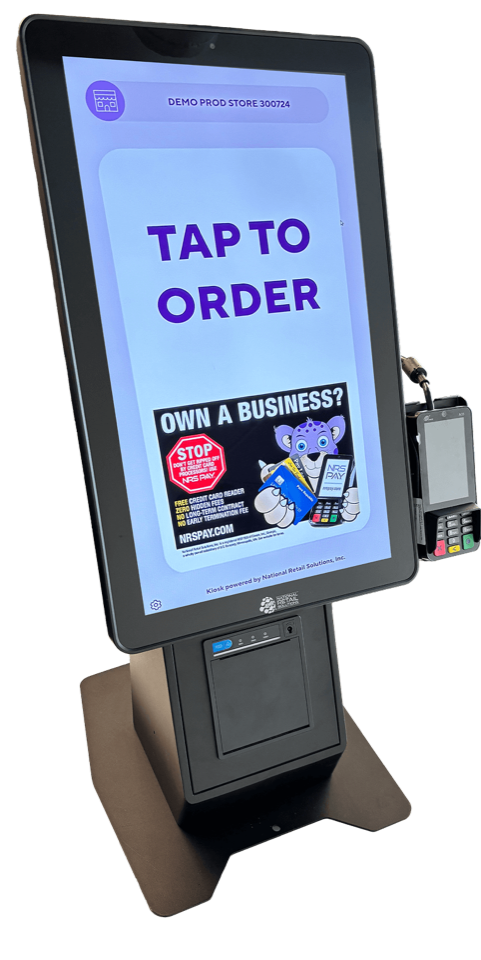
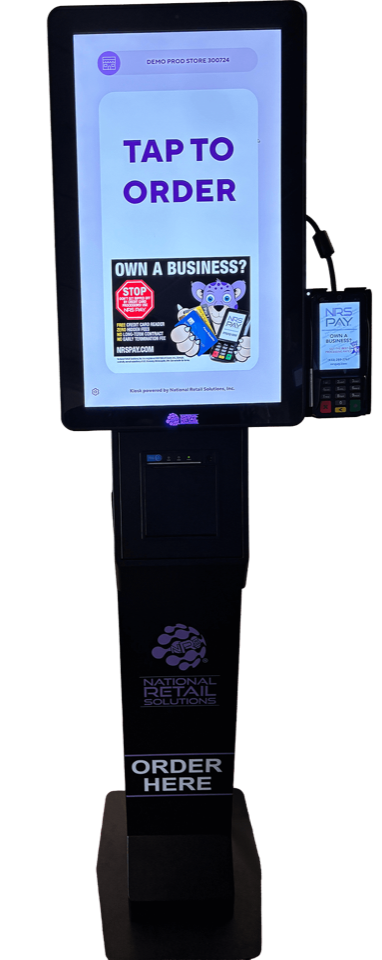
Representative equipment. Accessories, software, installation, and availability depend on the confirmed setup.
Is a self-ordering kiosk right for my business?
Start by identifying where customers wait. A kiosk may be worth exploring when staff spend much of a busy period entering repeatable orders. If food preparation is the bottleneck, adding an ordering screen alone may not help.
Consider your menu complexity, customer preferences, available space, and who will assist customers. Keep a staffed ordering option for people who need help.
Countertop or floor-standing: which should I choose?
Countertop: consider this when you have usable counter space and want the ordering screen close to staff. Check whether it will compete with pickup, payment, or food preparation space.
Floor-standing: consider a separate ordering position when you can provide room for customers to approach and queue. Review cable routing, power, circulation, and accessible use before deciding where it belongs.
Will an NRS kiosk work with my current POS?
The NRS kiosk is designed to work with an NRS POS. Its ordering flow can send orders to the register and integrated printers. Do not assume it connects to an unrelated POS. Tell Jet your exact system so the proposed configuration can be confirmed.
What does setup involve?
- Map the order: selecting items, modifiers, payment, preparation, and pickup.
- Review the equipment: current POS, printers, network, power, and placement.
- Prepare the menu: check item names, options, availability, and pricing.
- Plan a trial: test real order scenarios, staff assistance, and the fallback process before launch.
Confirm who handles each part of installation, menu setup, training, and ongoing support in the proposal.
More questions, answered
Can customers pay at the kiosk?
NRS describes payment at the kiosk or at the register, with NRS Pay processing integration. Confirm the available payment methods and equipment for your proposed setup.
Will a kiosk increase sales or reduce staffing?
Those outcomes are not guaranteed. Evaluate whether the kiosk addresses a real ordering problem, then measure adoption, order accuracy, wait times, and staff workload after launch.
What affects kiosk cost?
Hardware format, quantity, software, processing terms, installation, and any needed POS or printer changes affect the proposal. Ask Jet for a review based on your setup; equipment prices are not listed here.
What should I send Jet?
Start with your business type, location, current POS, and whether you prefer countertop or floor-standing equipment. If you are unsure, describe the ordering problem you want to solve.
How JetGo helps
Jet Bunditwong is your starting point for the conversation. JetGo works with NRS for POS and processing options; the provider confirms technical fit and implementation requirements. Start by describing your operation and what you want to improve.
Meet Jet · Running a convenience store with fuel? Explore NRS Petro.
Prepared by JetGo Business Solutions · Updated October 9, 2026. Product details checked against NRS manufacturer information. Ask Jet to confirm current specifications for your proposal.
Discuss my kiosk setup.
Tell Jet your business type and current POS. We’ll start with the fit, then discuss the equipment.
Discuss my kiosk setup